
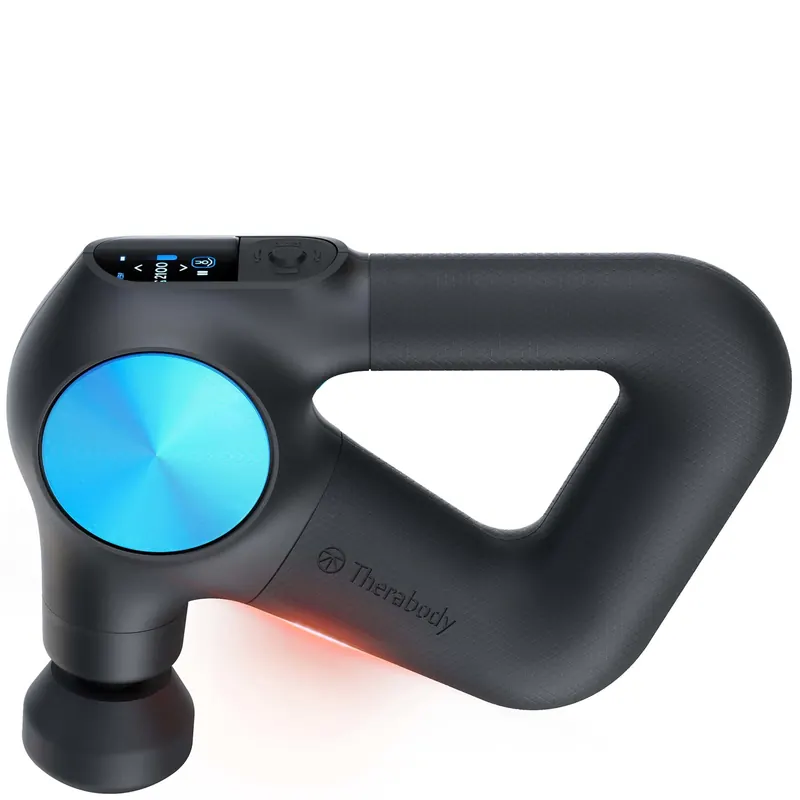

- Select a percussive therapy attachment and connect it to your device.
- Slide your hand into the ergonomically designed Theragun Triangle handle. Firmly press the center button on the front of the device to power on the Theragun PRO Plus device. The device’s TFT LCD screen will light up when the device is on.
- Select „Quick Start“ to begin using the device without a guided routine, or toggle through preset guided treatment routines and press the center button to select a treatment routine.
- Once your desired treatment is selected, toggle through the five speed options to increase or decrease treatment speed, respectively.
- Move the device across the areas in need of treatment, gradually applying light to moderate pressure as needed. The Force Meter will appear on the TFT LCD display momentarily when pressure is applied from the device to your body.
- Follow the preset treatment as the device guides you to move between muscle groups.
- To pause, skip, exit, or resume your treatment, toggle to the respective indicator and short press the button
Infrared LED light therapy.
The Theragun PRO Plus device is equipped with 13 LED lights to provide infrared LED light therapy. To add infrared LED light therapy to your routine, toggle to the infrared LED light indicator. Short press to turn the infrared LED light therapy on and short press to turn it off. Infrared LED light therapy is most effective when applied directly to the skin. Infrared LED light therapy will be applied to the treatment area simultaneously with percussive, vibration, and heat therapy. To maximize your treatment benefits, use for approximately 90 seconds on each treatment area. Infrared LED light therapy will not turn on during cold treatments.
Vibration therapy.
To add Vibration Therapy to your routine, connect the Vibration attachment to your device. Proceed to step 2 to use the device with the Vibration attachment.
Heat therapy.
To add Heat Therapy to your routine, connect the Heat Therapy attachment to your device. Short press the right button to toggle to the heat indicator. Short press the up button to increase the heat temperature and short press the down button to increase the heat temperature. There are three hot temperature settings, low, medium, and high.
- Low: Use the low temperature setting if you are new to heat therapy.
- Medium: Use the medium temperature setting for performance.
- High: Use the high temperature setting over light clothing or while moving quickly across a treatment area.
Cold therapy.
*Cold therapy attachment sold separately. To add Cold Therapy to your routine, connect the Cold Therapy attachment to your device. Short press the right button to toggle to the cold indicator. Short press the up button to make the temperature colder and vice versa. There are three cold temperature settings, low, medium, and high.
- Low: Use the low temperature setting on sensitive areas and if you are new to cold therapy.
- Medium: Use the medium temperature setting for full-body recovery and general discomfort.
- High: Use the high temperature setting for targeted pain relief.
Press and hold the center power button to power off the device
- Select a percussive therapy attachment and connect it to your device.
- Slide your hand into the ergonomically designed Theragun Triangle handle. Firmly press the center button on the front of the device to power on the Theragun PRO Plus device. The device’s TFT LCD screen will light up when the device is on.
- Select „Quick Start“ to begin using the device without a guided routine, or toggle through preset guided treatment routines and press the center button to select a treatment routine.
- Once your desired treatment is selected, toggle through the five speed options to increase or decrease treatment speed, respectively.
- Move the device across the areas in need of treatment, gradually applying light to moderate pressure as needed. The Force Meter will appear on the TFT LCD display momentarily when pressure is applied from the device to your body.
- Follow the preset treatment as the device guides you to move between muscle groups.
- To pause, skip, exit, or resume your treatment, toggle to the respective indicator and short press the button
Infrared LED light therapy.
The Theragun PRO Plus device is equipped with 13 LED lights to provide infrared LED light therapy. To add infrared LED light therapy to your routine, toggle to the infrared LED light indicator. Short press to turn the infrared LED light therapy on and short press to turn it off. Infrared LED light therapy is most effective when applied directly to the skin. Infrared LED light therapy will be applied to the treatment area simultaneously with percussive, vibration, and heat therapy. To maximize your treatment benefits, use for approximately 90 seconds on each treatment area. Infrared LED light therapy will not turn on during cold treatments.
Vibration therapy.
To add Vibration Therapy to your routine, connect the Vibration attachment to your device. Proceed to step 2 to use the device with the Vibration attachment.
Heat therapy.
To add Heat Therapy to your routine, connect the Heat Therapy attachment to your device. Short press the right button to toggle to the heat indicator. Short press the up button to increase the heat temperature and short press the down button to increase the heat temperature. There are three hot temperature settings, low, medium, and high.
- Low: Use the low temperature setting if you are new to heat therapy.
- Medium: Use the medium temperature setting for performance.
- High: Use the high temperature setting over light clothing or while moving quickly across a treatment area.
Cold therapy.
*Cold therapy attachment sold separately. To add Cold Therapy to your routine, connect the Cold Therapy attachment to your device. Short press the right button to toggle to the cold indicator. Short press the up button to make the temperature colder and vice versa. There are three cold temperature settings, low, medium, and high.
- Low: Use the low temperature setting on sensitive areas and if you are new to cold therapy.
- Medium: Use the medium temperature setting for full-body recovery and general discomfort.
- High: Use the high temperature setting for targeted pain relief.
Press and hold the center power button to power off the device


Rezensionen
Es gibt noch keine Rezensionen.