
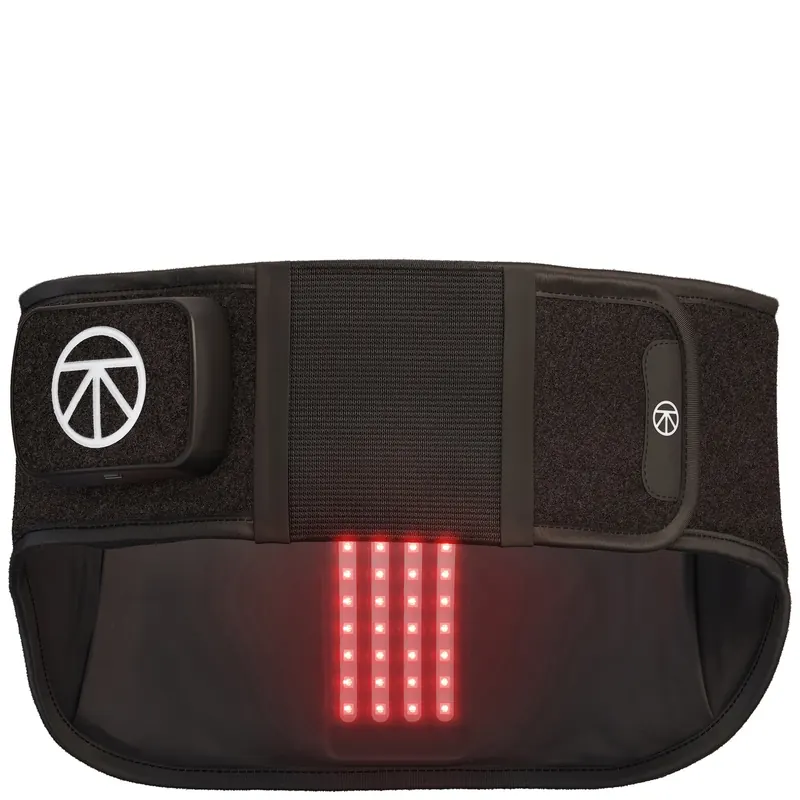

Putting on the Device
- Find a comfortable position sitting down or standing upright; we recommend standing for optimal placement. The device features a sleek, comfortable design that can be worn under or over clothes. For maximum benefit of all therapies included in the device, it’s recommended to be worn on bare skin.
- Detach the outer compression straps and let them hang down. These come folded and attached to themselves.
- Reach it around the back of your body and hold one strap in each hand.
- Wrap the left strap around your abdomen, then attach the right strap on top.
- Reach back and grab the outer compression straps, pull them tightly to your desired level of support and attach them in front. These can be attached over the control panel.
- Once comfortable, make sure that the Therabody logo is centered on your back. The control panel does not need to be centered in the front
Using the Device
1. Turn on the device.
Firmly press and hold the power button. The LED indicator on the button will turn on when the device is on.
2. Select a heat + far infrared setting.
Press the heat button to toggle between the three heat settings: low (default), medium, and high. Far infrared light therapy turns on when the heat setting is on. Heat and far infrared treatment will turn off after 20 minutes.
3. Select a vibration pattern.
Press the vibration button to toggle through the three vibration patterns: low (default), high, and wave. Vibration treatment will turn off after 20 minutes.
4. Turn near infrared LED light therapy on or off.
- Near infrared LED light therapy will turn on when the device is on (default). Press the near infrared LED light button to turn off this therapy. For this therapy to be effective, allow
- the device to directly contact your skin. Near infrared LED light treatment will turn off after 10 minutes (the recommended dosage for maximum treatment benefits).
5. Turn off the device.
The device will automatically shut off after the treatment is completed. Press the power button at any point during the treatment to turn off the device. The device will automatically shut off after 10 minutes if not in use. The LED light on the button will turn off when the device is off.
6. Lock the device.
When not in use or during transport, lock the device to prevent turning it on accidentally. Quickly press the power button three times to initiate the lock function. Each LED light will flash sequentially to indicate that the device is locked. Quickly press the button three times again to unlock. Each LED light will flash sequentially (in the opposite direction) to indicate that the device is unlocked
Putting on the Device
- Find a comfortable position sitting down or standing upright; we recommend standing for optimal placement. The device features a sleek, comfortable design that can be worn under or over clothes. For maximum benefit of all therapies included in the device, it’s recommended to be worn on bare skin.
- Detach the outer compression straps and let them hang down. These come folded and attached to themselves.
- Reach it around the back of your body and hold one strap in each hand.
- Wrap the left strap around your abdomen, then attach the right strap on top.
- Reach back and grab the outer compression straps, pull them tightly to your desired level of support and attach them in front. These can be attached over the control panel.
- Once comfortable, make sure that the Therabody logo is centered on your back. The control panel does not need to be centered in the front
Using the Device
1. Turn on the device.
Firmly press and hold the power button. The LED indicator on the button will turn on when the device is on.
2. Select a heat + far infrared setting.
Press the heat button to toggle between the three heat settings: low (default), medium, and high. Far infrared light therapy turns on when the heat setting is on. Heat and far infrared treatment will turn off after 20 minutes.
3. Select a vibration pattern.
Press the vibration button to toggle through the three vibration patterns: low (default), high, and wave. Vibration treatment will turn off after 20 minutes.
4. Turn near infrared LED light therapy on or off.
- Near infrared LED light therapy will turn on when the device is on (default). Press the near infrared LED light button to turn off this therapy. For this therapy to be effective, allow
- the device to directly contact your skin. Near infrared LED light treatment will turn off after 10 minutes (the recommended dosage for maximum treatment benefits).
5. Turn off the device.
The device will automatically shut off after the treatment is completed. Press the power button at any point during the treatment to turn off the device. The device will automatically shut off after 10 minutes if not in use. The LED light on the button will turn off when the device is off.
6. Lock the device.
When not in use or during transport, lock the device to prevent turning it on accidentally. Quickly press the power button three times to initiate the lock function. Each LED light will flash sequentially to indicate that the device is locked. Quickly press the button three times again to unlock. Each LED light will flash sequentially (in the opposite direction) to indicate that the device is unlocked


Rezensionen
Es gibt noch keine Rezensionen.